Your Loyal Desktop Companion 🐶
1. Hero Section
Every Mac deserves a companion. 🍎
We spend countless hours with our Macs - working, creating, coding, studying, and building. So why shouldn’t our desktops feel a little more alive?
Meet the Companion Your Mac Has Been Missing.
Rover brings a thoughtful, intelligent, and delightful virtual pet straight to your macOS workspace—blending quiet companionship with intuitive productivity tools.
2. Product Story
For many of us, the desktop is where we spend the majority of our day. We code, write, design, and manage projects, often moving from one digital task to another in a workspace that can feel efficient, yet occasionally sterile.
Desktop Rover was created to bring warmth back to the digital canvas.
It is a premium macOS companion designed to live alongside your workflow. Rover is not a demanding game or a distracting pop-up; instead, he is a gentle, living presence on your screen.
Whether he is napping on top of your active window, pacing across your dock, or curling up to rest during a deep-work session, Rover turns screen time into shared time.
By combining fluid, hand-crafted animations with subtle productivity features, Desktop Rover offers a unique balance: a charming virtual pet that respects your focus while adding a touch of personality to your daily routine.
3. Key Features
🩺 Healthy Work Habits
Work smarter, not longer.
Rover and Felix gently help you build healthier work routines with customizable focus sessions and thoughtful reminders. Whether it’s time to rest your eyes, stretch, hydrate, or simply step away for a moment, they encourage sustainable productivity without interrupting your flow.
🖥 A Living Desktop
A desktop with personality.
Beautifully crafted animations give your Mac a sense of personality. Rover and Felix move naturally around your desktop, creating a workspace that feels warm, dynamic, and delightfully alive without getting in your way.
⚡ Smart System Awareness
Quietly looking after your Mac.
Keep an eye on your Mac’s health with lightweight system monitoring and intuitive menu bar controls. Rover and Felix quietly monitor system activity while remaining remarkably efficient, so they integrate seamlessly into your workflow without slowing your Mac down.
☕ Stay Awake When You Need It
Sleep when you do—not when your Mac decides to.
Downloading large files, running long builds, giving a presentation, or processing hours of video? With a single click, Rover and Felix can prevent your Mac from sleeping until the job is done.
😊 Tiny Moments of Joy
Because every Mac deserves a companion.
Not every productivity tool needs another notification. Sometimes all it takes is a curious cat or a loyal dog quietly sharing your workspace, bringing a smile during long days and making every moment at your Mac just a little more enjoyable.
🐕 The Mischief Menu
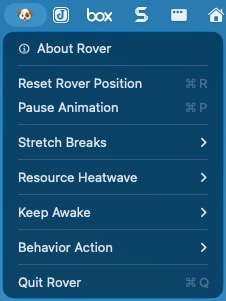
Click the Dog Icon (🐶) in your macOS Menu Bar to open Rover’s control station:
- About Rover: Opens a clean, retro-styled window displaying versioning, copyright information, and a custom close button.
- Reset Rover Position: Teleports Rover back to the center of your active screen (extremely useful for multi-monitor setups if Rover wanders off-screen).
- Pause / Resume Animation: Freezes/Resumes Rover’s frame loop when you need absolute, distraction-free focus.
- Stretch Breaks: A dedicated wellness subsystem nested cleanly as a menu option:
- Enable Stretch Breaks: Toggles active timer tracking with checkmark indicators (✓). This setting persists automatically across system restarts.
- Preview Break: Instantly triggers a snappy, 4-second preview of Rover’s stretch routine.
- Resource Heatwave: An intelligent ambient system health monitor nested as a menu option:
- Enable Resource Heatwave: Toggles active CPU, Memory, and Thermal monitoring.
- CPU Trigger Threshold: Customize the target CPU utilization threshold (70%, 80%, or 90%).
- Memory Trigger Threshold: Customize the target system memory consumption threshold (75%, 85%, or 95%).
- Polling Interval: Configures how frequently system metrics are polled (10 Seconds, 20 Seconds, or 30 Seconds—with a safe 20-second default).
- Preview Heatwave: Triggers an instant 8-second demonstration of Rover’s overheated animation and subsequent recovery sequence.
- Keep Awake: A helper utility that prevents macOS from going to sleep or activating the screensaver for a selected duration.
- Behavior Action (Manual State Overrides): Force Rover into any of his signature behavioral cycles for exactly 10 seconds before he automatically resumes his natural routine:
- Idle: Sits upright, pants, and wags his tail.
- Running: Classic, high-velocity running cycle.
- Sniffing: Low-snout floor tracking and shiver animations.
- Digging: Fast paw-shoveling with parabolic dirt particles that settle on the floor before dissolving.
- Scratching: Sits and rapidly scratches behind his floppy ear with a hind leg.
- Chasing Tail: Performs a comical 360 ∘ spin around his center pivot.
- Howling: Points his snout straight up and lets out a silent, dramatic howl.
- Sleeping: Lies flat, closes his eyes, and floats sleeping “Zzz” bubbles.
- Walking: A slow, realistic stroll.
- Stretching: Triggers a continuous, looping preview of Rover’s stretch and yawn cycle.
- Overheated: Forces Rover’s hot, exhausted sprawl posture.
- Recovering: Forces Rover’s post-heat yawn and sat sigh of relief.
- Quit Rover: Quit the app.
4. Why Desktop Rover is Different
Unlike traditional desktop widgets or static screen pets, Desktop Rover is built with a deep appreciation for the macOS ecosystem and the modern remote work experience.
- Respect for Focus: Desktop Rover is designed to support, not disrupt. His behaviors are tuned to ensure he never gets in the way of your active cursor or crucial system alerts.
- Crafted, Organic Motion: Every movement is designed to feel natural and endearing. The physics engine ensures smooth transitions, making his presence feel tangible and integrated into your daily workspace.
- Elegant Utility: By merging the emotional appeal of a virtual pet with practical tools like break reminders and timers, Desktop Rover serves a dual purpose as both a companion and a wellness aid.
📺 Watch a 22-seconds preview on YouTube: Desktop Rover
5. User Experience Highlights
The Morning Greeting
Start your workday on a positive note. When you first wake up your Mac, Rover is there to stretch, shake off sleep, and greet you as you open your first application.
The Gentle Break Reminder
Instead of a jarring system notification, imagine a soft animation of Rover nudging the edge of your active window, reminding you with a quiet gesture that it might be time to step away from the screen for a moment.
Deep Work Companionship
During long hours of writing or development, Rover finds a quiet spot near the corner of your screen, sleeping peacefully while you focus, providing a sense of quiet company during solitary tasks.
The Quiet Companion
During late-night study or development sessions, Rover finds a cozy corner of your desktop, ever vigilant and always upto something, a silent companion in the quiet hours of the night.
6. Closing Call-to-Action
Warm up your workspace.
Your desktop doesn’t have to feel like just another tool. Bring a little more joy, balance, and companionship to your daily workflow.
Adopt Rover and discover the difference a loyal companion makes: 
7. Help and Support
Report Issues
You can report any issues here: https://forms.gle/XDUkjJ2TJzEruakX9
Please provide clear, detailed information and the correct repository for the issue so it can be properly triaged and addressed.
🐱 Love cats? Meet Desktop Felix, your new digital companion.
© 2026 Santak Das, Tara Design Studio. All rights reserved.