🎥 The Hero Section
See Beneath the Frame with Video-Peek.
The native, studio-grade video specification analyzer and side-by-side A-B diff comparator engineered exclusively for macOS.
📖 The Product Story
Why we built Video-Peek
In digital cinema, broadcast mastering, color grading, and streaming delivery, video workflows are more complex than ever:
- Color space confusion: Did your render preserve wide-gamut ITU-R BT.2020 HDR10, or was it quietly clamped to standard Rec.709 SDR?
- Chroma subsampling drops: Did your mastering transcode maintain 10-bit 4:2:2 master fidelity, or was it degraded to 8-bit 4:2:0?
- Frame rate pull-downs & drift: Did an automated web pipeline drop 2 frames or introduce a 23.976 $\rightarrow$ 29.97 fps pulldown stutter?
- Bloated tooling: Opening DaVinci Resolve or Final Cut Pro just to check a video’s transfer function (EOTF) or FourCC codec takes 30 seconds. QuickTime Player’s basic inspector hides crucial mastering data, and terminal tools like
ffprobedisrupt your creative flow.
We asked a simple question: What if you had a blazing-fast, visually pristine Mac app that reveals the complete DNA of any video file in under 200 milliseconds?
Video-Peek was created at Tara Design Studio to answer that need. Built from the ground up in 100% native Swift and SwiftUI, Video-Peek taps directly into Apple’s low-level CoreMedia, AVFoundation, VideoToolbox, and CryptoKit frameworks. No web runtimes. No GPU memory exhaustion. Just pure, instant video intelligence.
⚡ Key Features
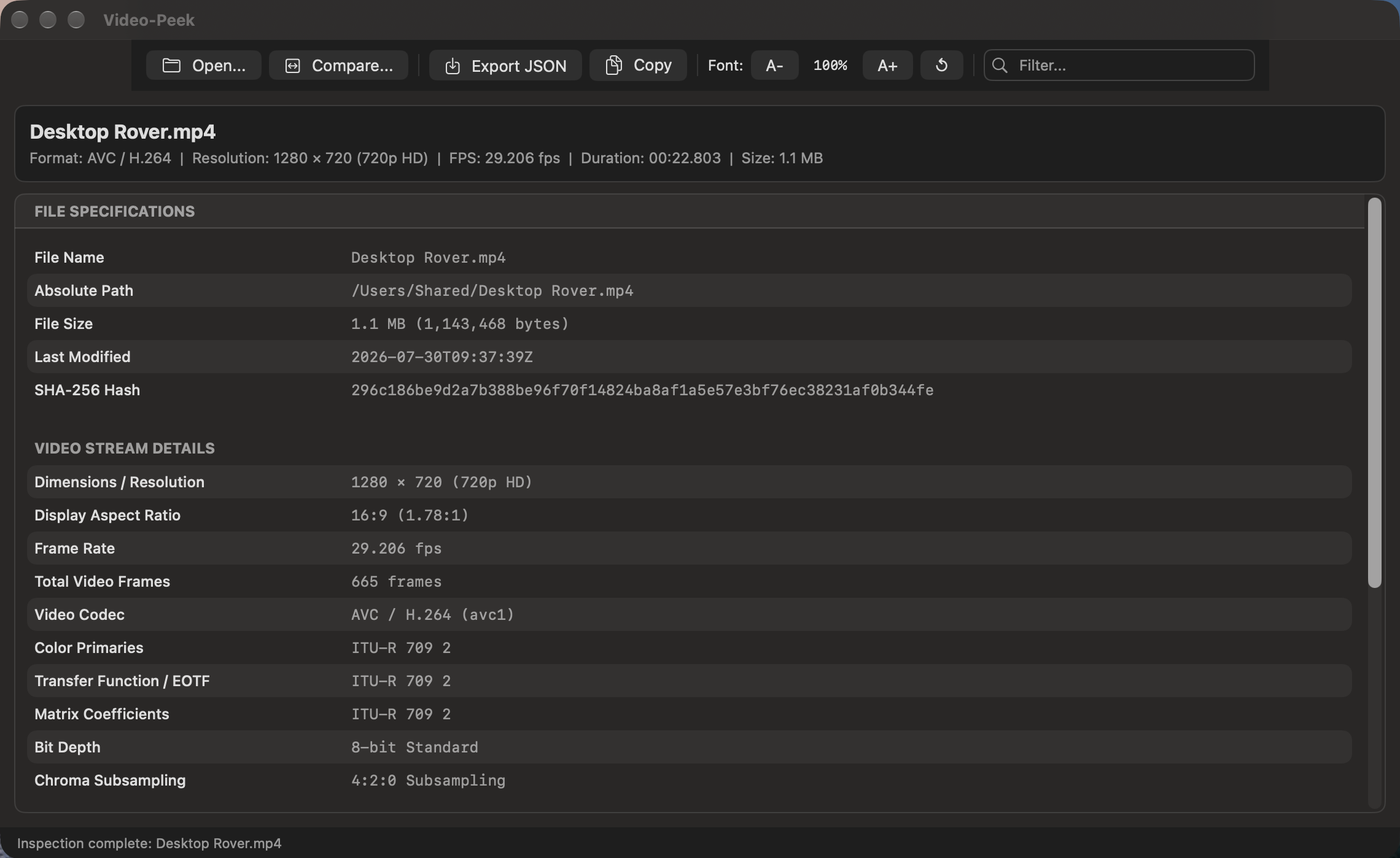
🎞️ Deep Visual Bitstream DemuxingInspect true FourCC codec tags ( |
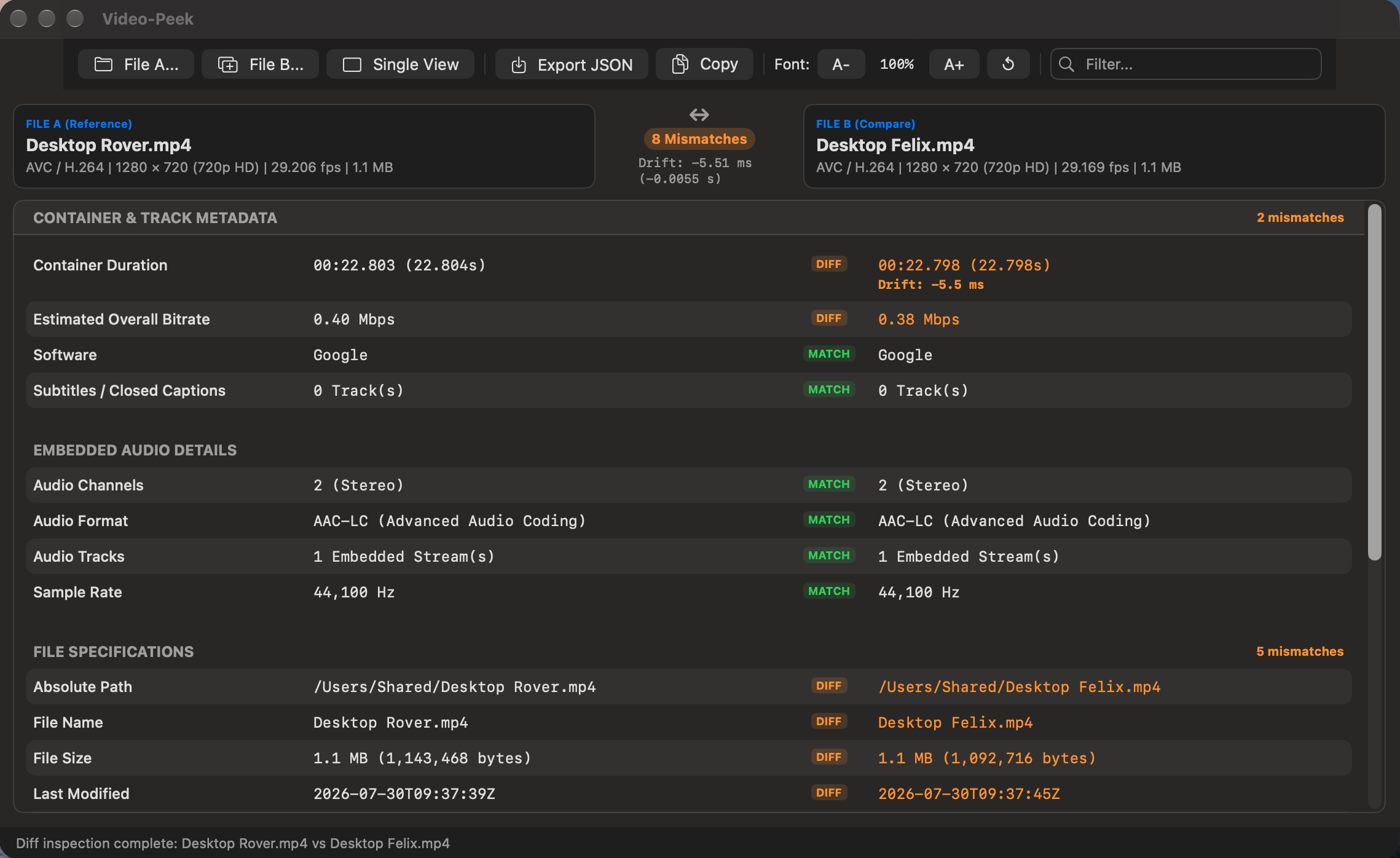
⚖️ Side-by-Side A-B Video ComparatorCompare two video files simultaneously. Video-Peek aligns property keys and instantly highlights resolution scaling, color gamut drops, chroma downgrades, and missing audio tracks. |
⏱️ Frame-Accurate Drift & Timecode AnalyticsDetect exact frame drops ( |
🎨 Color Primaries, HDR & EOTF ProfilingInstantly extract Color Primaries (BT.709, BT.2020, DCI-P3), Transfer Characteristics (SDR, SMPTE ST 2084 / PQ HDR10, ARIB STD-B67 / HLG, Apple Log), and YCbCr matrix coefficients. |
🛡️ Hardware-Accelerated SHA-256Stream massive 100+ GB ProRes or camera raw masters in 64 KB binary chunks through Apple Silicon’s hardware cryptographic engine without memory bloat. |
🔤 Scoped Report Font ZoomAdjust the reporting table’s typography independently ( |
🎯 Universal Container & Codec Support
Video-Peek parses uncompressed cinema masters, broadcast containers, and web streams:
| Category | Supported Containers & Codecs |
|---|---|
| Cinema & Post-Production | Apple ProRes Family (ProRes 422 HQ, 422, LT, Proxy, 4444, 4444 XQ in .mov), Apple ProRes RAW |
| Modern Web & Streaming | HEVC / H.265 (Main 10, HDR10, Dolby Vision), H.264 / AVC (High, Main, Baseline), AV1 (.mp4, .mkv, .webm) |
| Broadcast & Archival | Broadcast MXF (.mxf), MPEG Transport Stream (.ts, .mts, .m2ts), Audio Video Interleave (.avi), Matroska (.mkv) |
| Embedded Audio Streams | Linear PCM (24/32-bit Multi-Channel), AAC-LC, Dolby Digital (AC-3), Dolby Digital Plus (E-AC-3), ALAC, FLAC |
| Subtitles & Timecodes | SMPTE Timecode Tracks, CEA-608 / CEA-708 Closed Captions, TX3G, WebVTT |
🏆 Why Video-Peek is Different
Most diagnostic utilities are bloated ports. Video-Peek is built exclusively for macOS:
✨ User Experience Highlights
1. Dual-Drop Compare Mode
Select two video files in Finder (like your 4K ProRes master and your 1080p H.265 YouTube render) and drag them together onto Video-Peek. The window instantly transitions into a two-column comparative diff table, highlighting mismatches in bold amber and identical parameters in calm green.
2. Zero VRAM Exhaustion on Massive Master Files
Thanks to non-blocking stream demuxing, dropping a 120 GB ProRes 4444 XQ feature film master takes the exact same fraction of a second as opening a 15 MB MP4 screen recording.
3. Native Mac Ergonomics
- Full support for macOS Dark and Light modes.
- Universal keyboard shortcuts (
⌘Oto open,⌘Eto export,⌘Cto copy,⌘+to scale text,⇧⌘Lto view logs). - Multi-column search bar that filters video keys, codecs, and color properties instantly as you type.
🚀 Elevate Your Video Mastering & Workflow
Stop guessing what is inside your video containers. Verify color gamuts, confirm chroma subsampling, and validate frame-rate parity with precision.
💬 Help & Support
Frequently Asked Questions
💡 Click any question below to expand the answer.
© 2026 Santak Das, Tara Design Studio. All rights reserved.