📷 The Hero Section
See Beneath the Pixel with Image-Peek.
Native, high-performance image specification analyzer, deep EXIF/optical inspector, and A-B image comparator for macOS
📖 The Product Story
Why we built Image-Peek
In modern digital photography, graphic design, print publishing, and web development, managing visual assets is fraught with hidden complexities:
- Color space stripping: Did your export retain Display P3 or Adobe RGB (1998) wide-gamuts, or was it silently clipped to generic sRGB?
- Optical & EXIF parameter verification: What focal length, aperture, shutter speed, and ISO were used? Are camera body/lens serial numbers and exact capture timestamps preserved?
- Quantization & bit depth drops: Did your 16-bit TIFF retain its smooth gradients, or did an automated pipeline compress it down to 8-bit with banding?
- Metadata & rights leakage: Are your IPTC copyright notices, EXIF lens parameters, and GPS location tags properly embedded or scrubbed for privacy?
- Bloated tooling: Opening Adobe Photoshop, Lightroom, or Bridge just to check an image’s DPI, embedded ICC profile, or bits-per-pixel ratio takes 20+ seconds. macOS Preview’s Inspector hides structural data, and terminal tools like
exiftooldisrupt your visual workflow.
We asked a simple question: What if you had a blazing-fast, visually pristine Mac app that reveals the complete DNA of any image file in under 200 milliseconds?
Image-Peek was created at Tara Design Studio to answer that need. Built from the ground up in 100% native Swift and SwiftUI, Image-Peek taps directly into Apple’s low-level ImageIO, CoreGraphics, and CryptoKit frameworks. No web runtimes. No full-bitmap RAM bloat. Just pure, instant visual intelligence.
⚡ Key Features
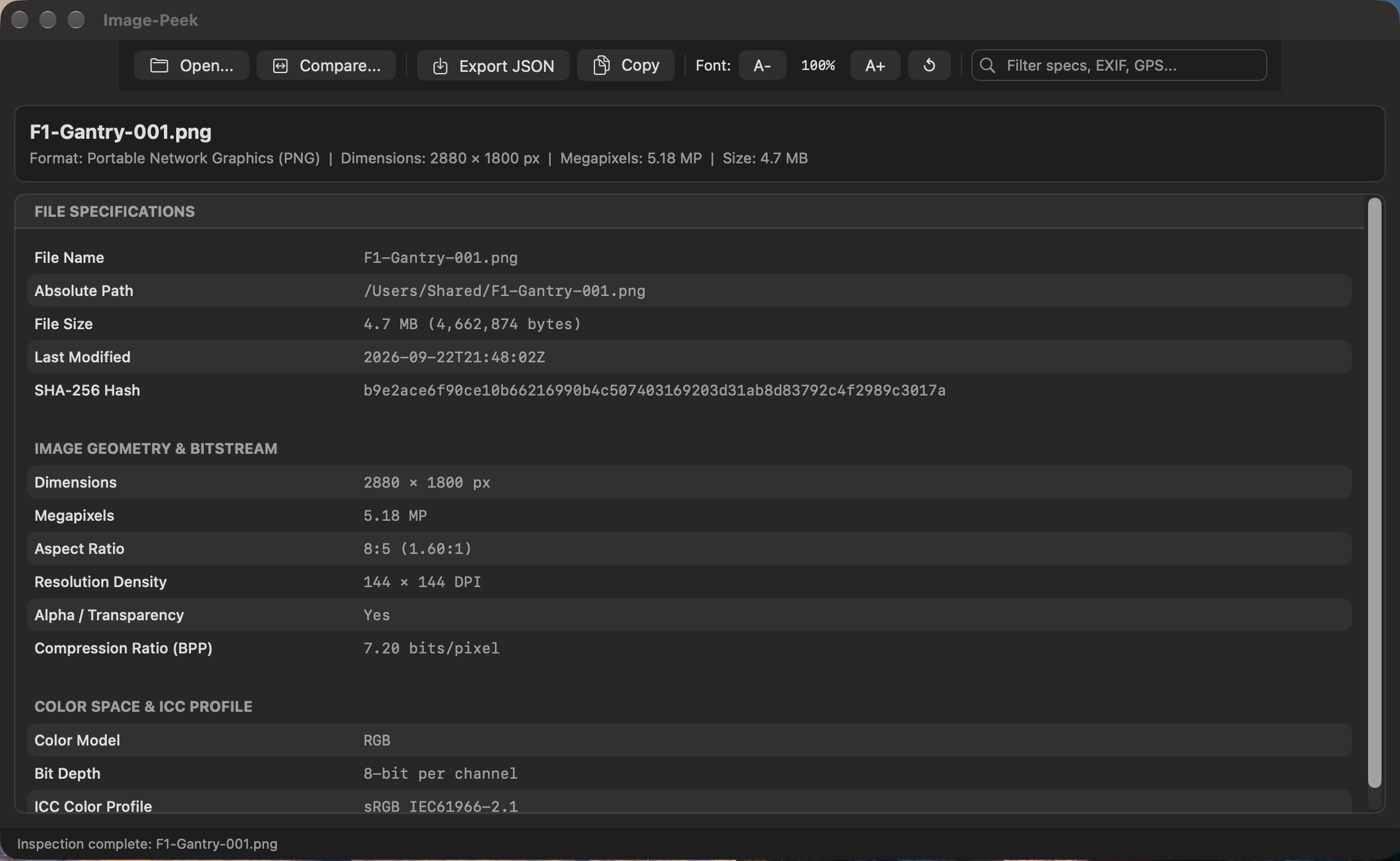
🖼️ Deep Image Stream DemuxingInspect true dimensions, pixel densities (DPI), Megapixels, bit depths (8/10/12/14/16-bit), color models (RGB, CMYK, Lab, Grayscale), alpha channels, and animation frame counts without loading gigabytes of raw uncompressed bitmap arrays into memory. |
📷 Deep EXIF & Optical Shooting TelemetryDecodes Aperture (ƒ-stop), Shutter Speed fractions, ISO speed, 35mm-equivalent focal lengths, Exposure Bias (EV), Metering Modes, Flash status, White Balance, and Camera/Lens hardware models & serial numbers. |
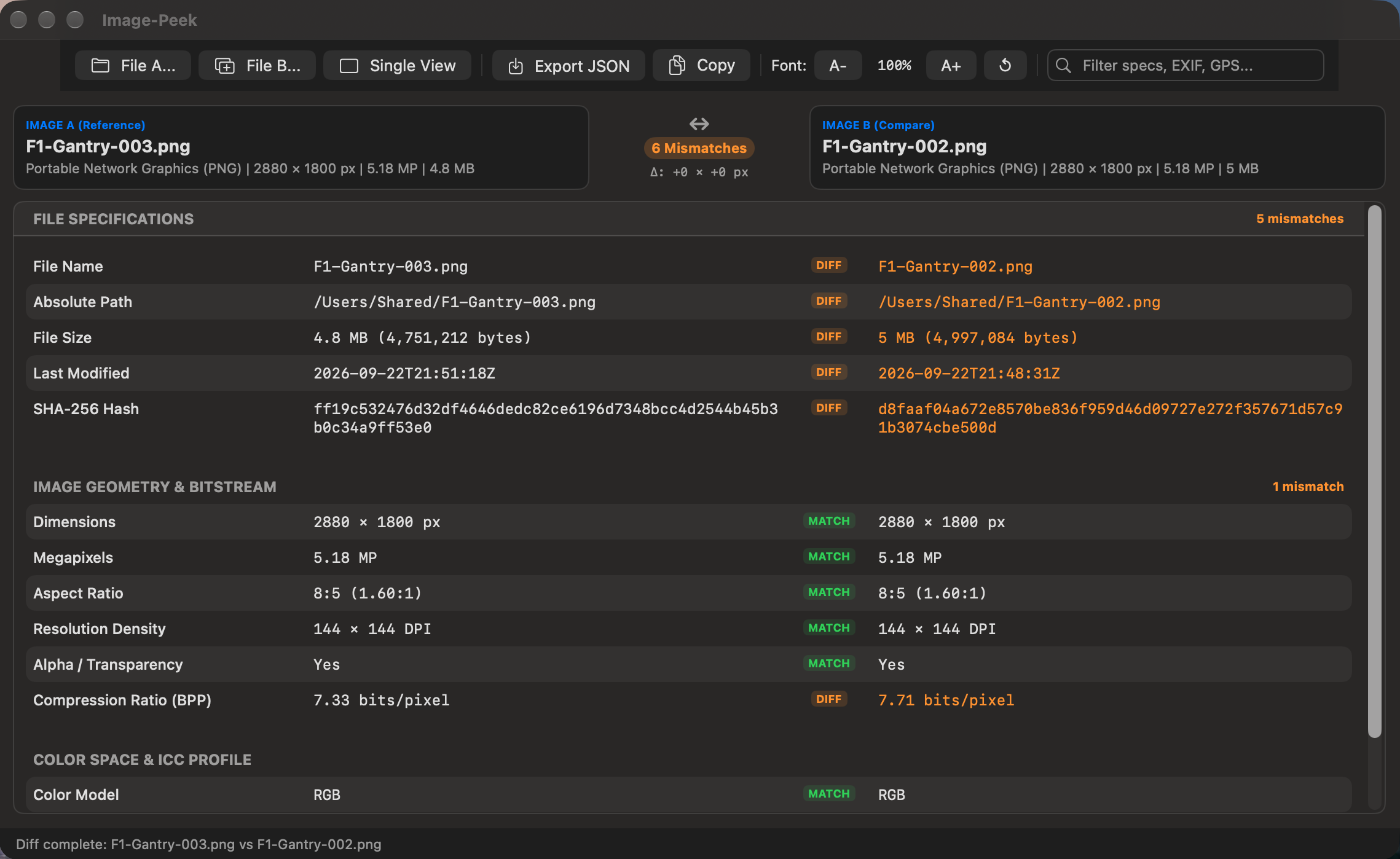
⚖️ Side-by-Side A-B Image ComparatorCompare two images simultaneously. Image-Peek aligns property keys and instantly highlights dimension scaling, megapixel deltas, color gamut shifts, and missing IPTC copyright tags. |
🗺️ GPS Telemetry & One-Click MapsExtracts DMS coordinates, signed decimal latitude/longitude, altitude meters, velocity, and UTC capture timestamps with a built-in one-click shortcut to launch the location in Apple Maps. |
📐 Precision Dimension & Megapixel DeltasDetect exact pixel scaling ( |
🎨 ICC Color Space & Profile IntrospectionInstantly extract embedded ICC Color Profiles (Display P3, Adobe RGB 1998, ProPhoto RGB, Rec. 2020, sRGB) and verify true quantization depth per channel. |
📷 Comprehensive EXIF, GPS & IPTC RightsInspect optical camera data (Aperture, Shutter Speed, ISO, Lens Model, Focal Length), exact GPS coordinates with altitude, and IPTC creator/copyright attribution. |
🛡️ Hardware-Accelerated SHA-256Stream massive multi-hundred-megabyte medium format RAW files or uncompressed TIFF archives in 64 KB binary chunks through Apple Silicon’s hardware cryptographic engine. |
🎯 Universal Image Format Support
Image-Peek parses professional RAW camera masters, vector graphics, print containers, and next-gen web images:
| Category | Supported Formats & Containers |
|---|---|
| Professional Camera RAW | Adobe DNG (.dng), Canon RAW (.cr2, .cr3), Nikon Electronic (.nef), Sony Alpha RAW (.arw), Generic RAW (.raw) |
| Next-Gen Web & Modern Formats | Apple HEIC / HEIF (.heic, .heif), Google WebP (.webp), AV1 Image File Format (.avif) |
| Standard Raster & Vectors | JPEG / JFIF (.jpg, .jpeg), PNG / APNG (.png), Scalable Vector Graphics (.svg), Windows Bitmap (.bmp) |
| Print, Prepress & Animation | Tagged Image File Format (.tiff, .tif in 8/16/32-bit RGB & CMYK), Graphics Interchange Format (.gif with frame counts) |
🏆 Why Image-Peek is Different
Most image inspection utilities are either bloated photo managers or terminal scripts. Image-Peek is built exclusively for macOS:
✨ User Experience Highlights
1. Dual-Drop Compare Mode
Select two image files in Finder (like your 100 MP medium-format RAW master and your web WebP render) and drag them together onto Image-Peek. The app instantly presents a two-column comparative diff table, highlighting mismatches in bold amber and matching parameters in calm green.
2. Quick Shooting Stats & Optical Introspection
When you load a photo containing EXIF headers, Image-Peek immediately shows an EXIF badge and a shooting summary pill (📷 50mm • ƒ/2.8 • 1/500s • ISO 100) directly in the header banner.
3. Interactive GPS Map Integration
Clicking the View Map button next to any decimal GPS coordinate immediately opens Apple Maps at the exact geolocation where the photograph was captured.
4. Zero RAM Bloat on Gigapixel & RAW Files
Thanks to stream-header demuxing via ImageIO, dropping a 500 MB 16-bit uncompressed TIFF or a 45 MP DNG RAW takes the exact same fraction of a second as opening a 50 KB thumbnail icon.
🚀 Elevate Your Digital Photography & Imaging Workflow
Stop guessing what is inside your image files. Verify color profiles, confirm bit depths, and validate copyright attribution with pixel-perfect precision.
💬 Help & Support
Frequently Asked Questions
💡 Click any question below to expand the answer.
© 2026 Santak Das, Tara Design Studio. All rights reserved.