🎹 The Hero Section
See Beneath the Waveform with Audio-Peek.
The native, studio-grade audio specification analyzer and side-by-side A-B diff comparator engineered exclusively for macOS.
📖 The Product Story
Why we built Audio-Peek
If you work with sound—whether you are a mastering engineer, sound designer, podcaster, or high-resolution audiophile—you encounter a constant frustration: audio metadata tools are broken.
- Command-line utilities like
ffprobeare powerful, but memorizing terminal flags and parsing dense text walls halts creative momentum. - Legacy tag editors focus only on artist and album text, completely ignoring the structural reality of the bitstream: Audio Stream Basic Descriptions (ASBD), true quantization bit depths, pre-skip encoder delays, and uncompressed channel maps.
- Cross-platform Electron utilities lag, consume gigabytes of RAM, and take seconds just to launch.
We asked a simple question: What if you had a blazing-fast, visually pristine Mac app that reveals the complete DNA of any audio file in under 200 milliseconds?
Audio-Peek was created at Tara Design Studio to answer that need. Built from the ground up in 100% native Swift and SwiftUI, Audio-Peek taps directly into Apple’s low-level CoreAudio, AudioToolbox, and CryptoKit engines. No web runtimes. No memory bloat. Just pure, instant audio intelligence.
⚡ Key Features
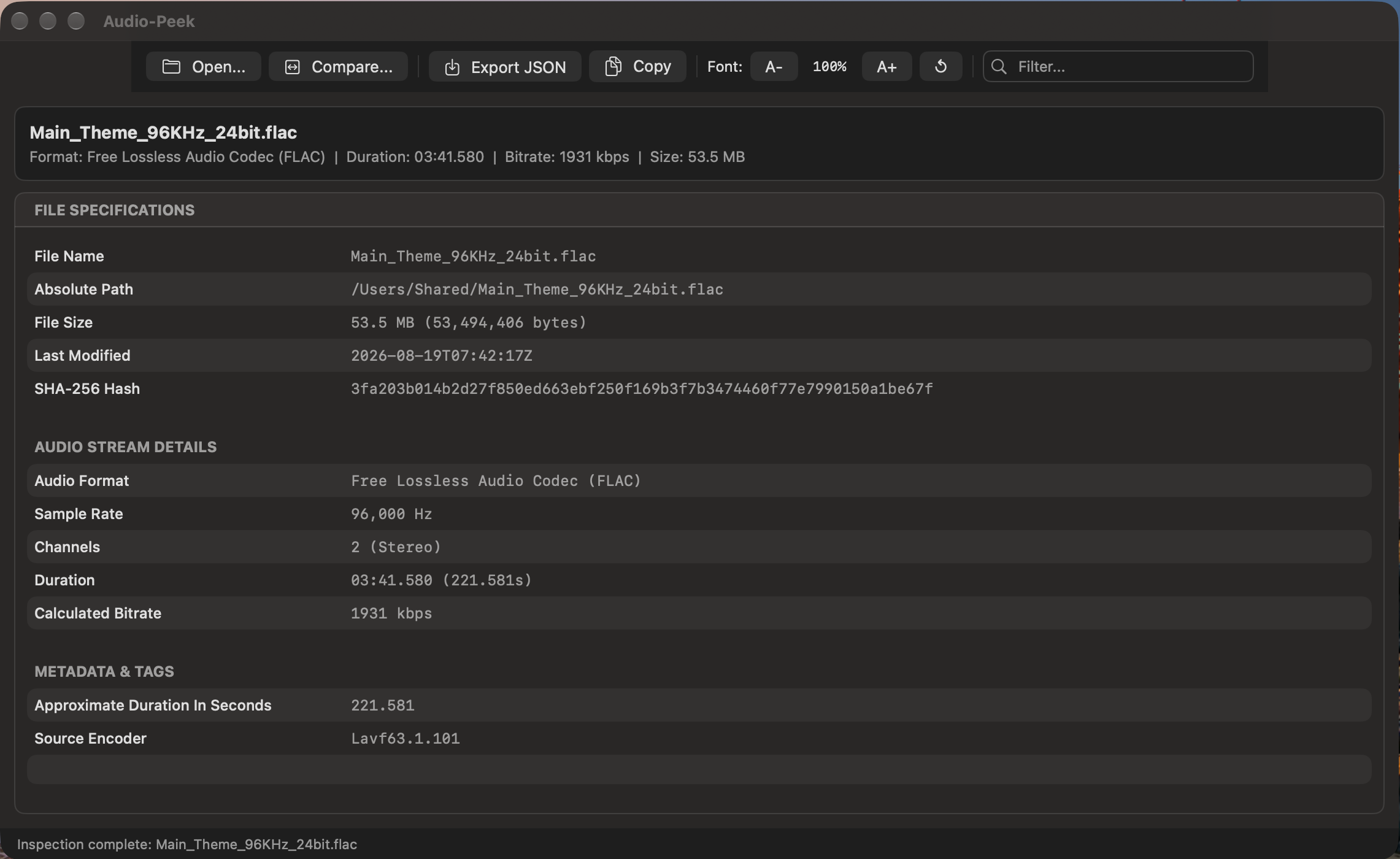
🔍 Deep Bitstream DemuxingInspect true hardware sample rates, bit depths (16/24/32-bit), channel configurations, MPEG versions, VBR/CBR modes, and container atoms without decoding raw audio into RAM. |
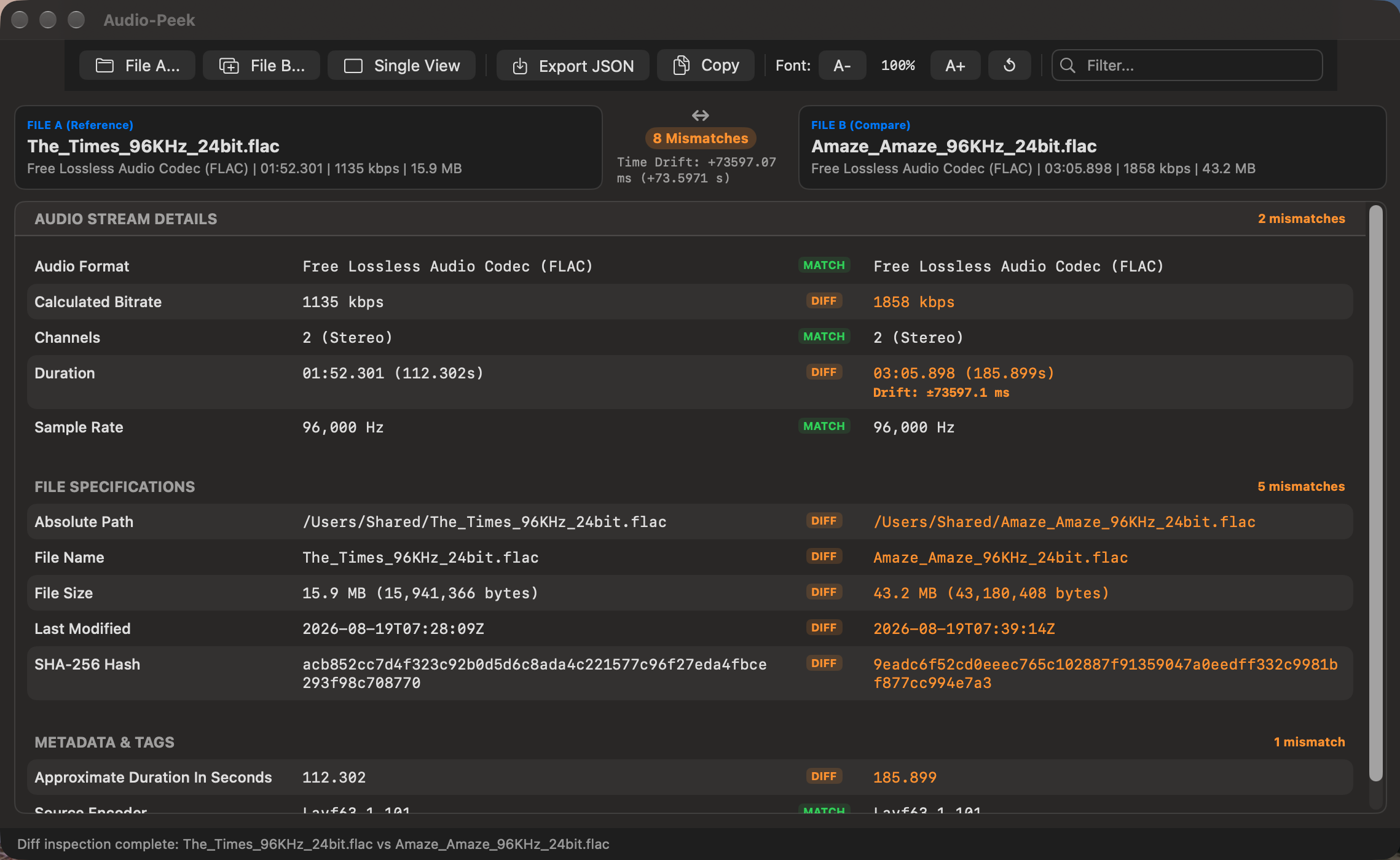
⚖️ Side-by-Side A-B Audio ComparatorCompare two audio files simultaneously. Audio-Peek aligns property keys and instantly highlights format mismatches, sample rate conversions, and missing metadata tags. |
⏱️ Sub-Millisecond Drift DetectionDetect encoder latency, leading silence padding, and pre-skip sample offsets (down to 0.1ms) between mastering masters and lossy transcode exports. |
🛡️ Hardware-Accelerated SHA-256Stream massive multi-gigabyte DSD or WAV master files in 64 KB binary chunks through Apple Silicon’s hardware cryptographic engine without memory spikes. |
🔤 Scoped Report Font ZoomAdjust the reporting table’s typography independently ( |
💾 Sandbox-Safe JSON & Clipboard ExportExport single-file or comparative A-B diff reports to formatted JSON with one click using native asynchronous, AppKit-friendly save sheets. |
🎯 Universal Format Support
Audio-Peek parses both uncompressed studio masters and modern web formats:
| Format Category | Supported Codecs & Containers |
|---|---|
| Lossless Studio Masters | FLAC (16/24/32-bit), WAV / Broadcast WAV (Linear PCM), AIFF / AIFC (Apple PCM) |
| Apple Ecosystem | M4A / MP4 (Apple Lossless ALAC, AAC-LC, HE-AAC, Audiobooks) |
| Modern Streaming & Web | Ogg Opus (48kHz synthesis, pre-skip framing), Ogg Vorbis (Nominal/Target Bitrates) |
| Audiophile & Archival | DSD / SACD (Direct Stream Digital .dsf, .dff at DSD64 to DSD512), WavPack (.wv) |
| Legacy Media | MP3 (MPEG-1/2/2.5 Layers I, II, III with CBR/VBR & LAME encoder tags) |
🏆 Why Audio-Peek is Different
Most diagnostic utilities are bloated ports. Audio-Peek is built exclusively for macOS:
✨ User Experience Highlights
1. Dual-Drop Compare Mode
Select two tracks in Finder (like your Master WAV and your Spotify MP3 upload) and drag them together onto Audio-Peek. The window instantly transitions into a two-column comparative diff table, highlighting mismatches in bold amber and identical parameters in calm green.
2. Zero Wait Time on Massive Files
Thanks to non-blocking stream demuxing, dropping a 15 GB DSD256 orchestra master takes the exact same fraction of a second as opening a 3 MB MP3 voice memo.
3. Native Mac Ergonomics
- Full support for macOS Dark and Light modes.
- Universal keyboard shortcuts (
⌘Oto open,⌘Eto export,⌘Cto copy,⌘+to scale text,⇧⌘Lto view logs). - Multi-column search bar that filters keys and values instantly as you type.
🚀 Elevate Your Audio Workflow
Stop guessing what is inside your audio containers. Verify bit depths, confirm sample rate conversions, and validate release metadata with precision.
💬 Help & Support
Frequently Asked Questions
💡 Click any question below to expand the answer.
© 2026 Santak Das, Tara Design Studio. All rights reserved.